Free iPhone mockup online, no Photoshop needed
Yes, you can make a free iPhone mockup here without an account. The live preview has no limit, and every day you get 3 HD exports at 1600 pixels with a small corner mark. Pick a phone, a color, a background and an angle, then download a PNG, WebP or JPG.
By The Bezelyard team (Product and testing). Last updated .
How to get a free iPhone mockup, step by step
- Open this page. There is nothing to install and no sign-up.
- Drop a screenshot, or try the sample screen first.
- Pick a phone such as the iPhone 17 in Sage, plus a background and an angle.
- Leave Quality on HD (1600 px), which is the free tier.
- Press Export mockup and save the file.
The live preview is always free, and you get 3 free HD exports a day with a small mark. See the pricing page for clean 4K exports, or read how we test every frame.
What is free, and what costs a credit
To begin with, everything you see in the editor is free. You can switch devices, try every color, change the background and drag the angle sliders as often as you like. Then, when the image looks right, you get 3 HD exports each day at no cost. Each one is 1600 pixels on the long side and carries a small mark in a corner.
In contrast, a credit only matters when you need a clean file or more pixels. One credit buys one export at 2K or 4K with no mark. A pack of 25 credits costs $6.99, and the credits never expire. Also, if an export fails, the credit stays in your account.
A free iPhone mockup vs a PSD template site
Template sites hand you a Photoshop file with a smart object. So you need Photoshop or a similar editor, you need to find the right layer, and then you paste and scale your screen by hand. That works, but it takes a while for a single image, and the photo locks the device angle.
Our editor, by contrast, works the other way around. You drop the screenshot first, and the frame fits it at the native size of the screen. Instead of one fixed shot, you can turn the phone 40 degrees either way, lean it, or flip it to landscape. The tradeoff is scenery: we draw frames only, so there are no hands, desks or coffee cups.
Who the daily HD exports are good for
A free iPhone mockup at HD size covers a lot of real work. For example, a founder can draft a Product Hunt gallery, a designer can drop a phone into a Slack update, and a student can finish a class project. At 1600 pixels, the image is sharp on a laptop screen and in most social feeds.
However, the corner mark shows on every free file. So for an App Store page, a paid ad or a client deliverable, spend one credit on a clean 2K export. At $6.99 for 25 credits, each clean file costs about 28 cents.
Free vs credit iPhone mockup exports
| Item | Value |
|---|---|
| Live preview | Free, no limit |
| Free HD exports | 3 a day, 1600 px, small corner mark |
| Credit export | 2560 px or 3840 px, no mark |
| Credit pack | $6.99 for 25 credits |
| Credit expiry | Never |
| Failed export | No credit used |
| Account needed | Only to buy and keep credits |
Free iPhone mockup tested with a real screenshot
We rendered this image with the same code the tool on this page uses, from a demo app screenshot we drew ourselves. So the picture and the numbers below come from that run, not from a stock photo.
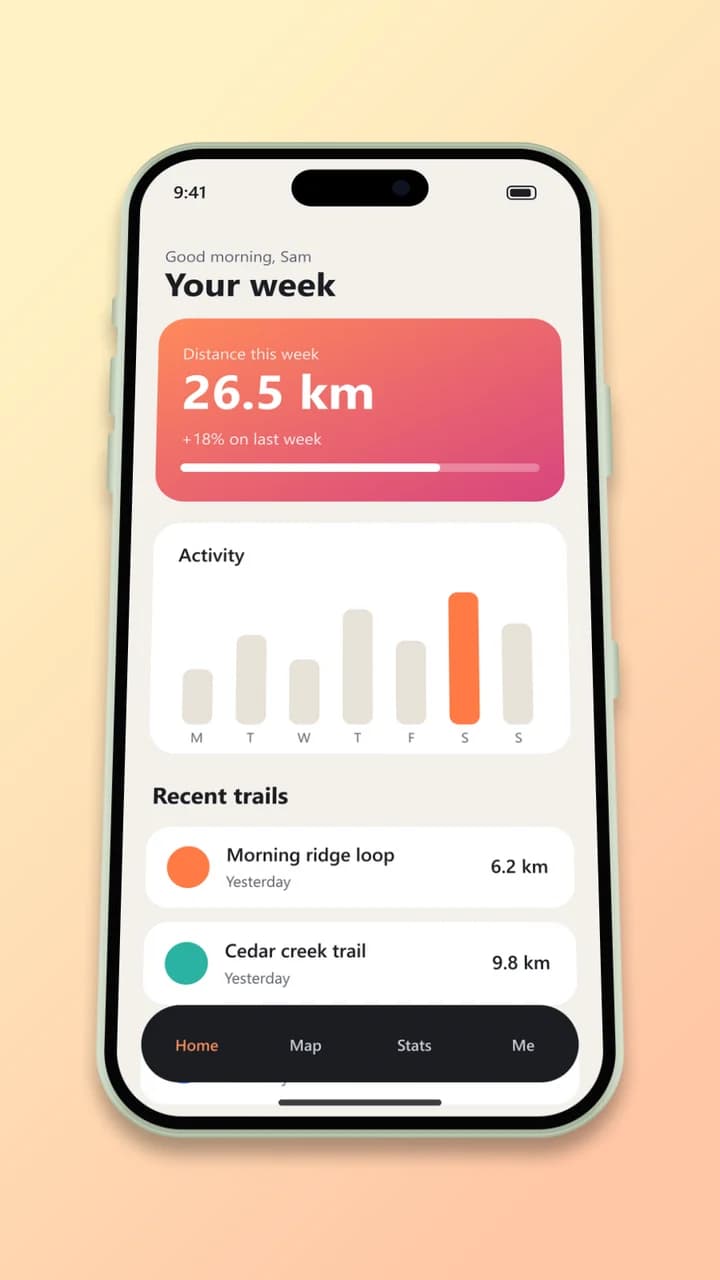
- Test input
- phone-app.png (1206 x 2622 px, our own demo app)
- Output
- iPhone 17 mockup, 900 x 1600 px PNG
- Device
- iPhone 17
- Export size
- 900 x 1600 px
- Angle
- 0° turn, 18° lean
- Background
- linear
- File size
- 519 KB
- Render time
- 226 ms
How we check exports: a script renders every device, compares the screen area with the published resolution, and we look at each frame at full size. More on the about page.
Free iPhone mockup FAQ
Is this free iPhone mockup tool really free?
Yes. The preview never costs anything, and 3 HD exports a day are free. You only pay if you want a clean 2K or 4K file.
Do free exports have a watermark?
They have a small bezelyard.com mark in one corner. It stays out of the way, but it shows, so use a credit for store pages and ads.
Do I need Photoshop or Figma?
No. The editor runs in your browser, and the export comes back as a ready PNG, WebP or JPG. You can place it in any app afterward.
Can I use free mockups for commercial work?
Yes, the images you export are yours. Apple has its own rules about showing its devices in ads and on the App Store, so check them before you publish.
Is there a limit on previews?
No. You can preview as many mockups as you want. The daily limit applies only to the 3 free HD downloads.