iPad mockup generator
To make an iPad mockup, upload a tablet screenshot, pick the iPad Pro 13 or the iPad Air 11 and then choose portrait or landscape. After that, add a background, a shadow and an angle. The iPad Pro screen is 2752 x 2064 pixels, so a native capture fills it at full size.
By The Bezelyard team (Product and testing). Last updated .
How to make an iPad mockup, step by step
- Take a screenshot on your iPad, or export a 2064 x 2752 frame from your design app.
- Drop the file onto the tool, or click Choose screenshot.
- Pick iPad Pro 13-inch or iPad Air 11-inch, in Space Black or Silver.
- Switch to landscape if your app runs wide, then choose a background.
- Add a shadow and an angle, and export the file.
The live preview is always free, and you get 3 free HD exports a day with a small mark. See the pricing page for clean 4K exports, or read how we test every frame.
Two iPad frames drawn to the real screen sizes
Apple lists the iPad Pro 13 inch display at 2752 by 2064 pixels and 264 ppi. So we drew that frame around a screen of exactly that size, with thin, even bezels and the camera dot on the long edge. A screenshot from the tablet then drops in pixel for pixel.
The iPad Air 11 inch has a 2360 by 1640 pixel screen, also at 264 ppi. Its bezels are a little wider, so it looks friendlier in a classroom or family app. In addition, both frames come in Space Black and Silver, which covers dark and light designs.
Portrait or landscape iPad mockup
Reading apps, recipe apps and forms often look best in portrait, because a tall page shows more lines. Dashboards, video editors and spreadsheets, however, need the wide view. So the tool rotates the iPad with one switch, and the screenshot fills the turned screen.
For a landscape shot, set the canvas to Wide 16:9. That way the tablet fills the frame instead of floating in empty space. We tried this with our demo recipe app on a soft lilac spotlight with a Silver iPad Pro, and the wide canvas made a clean header for a blog post.
Where an iPad mockup earns its place
A tablet frame tells people your app works on a big screen. For example, an App Store page for iPad, a pitch deck slide or a feature grid on your site all benefit from it. Also, a tablet next to a phone shows that the layout adapts, which a single phone shot cannot do.
For the side by side look, export the iPad and an iPhone with the same background and angle. Then place them together on a slide. Because the colors and light match, the pair reads as one product rather than two screenshots from different days.
Exports, sizes and privacy
The preview is free and has no limit. Also, three HD exports a day are free at 1600 pixels, each with a small corner mark. For print or a large hero, a credit gives you a clean 2K or 4K file instead.
A pack of 25 credits costs $6.99 and never expires, and a failed export never uses a credit. Finally, your screenshot lives in memory for one export only. We do not store it.
iPad mockup frame specs
| Item | Value |
|---|---|
| iPad Pro 13-inch screen | 2064 x 2752 px at 264 ppi |
| iPad Air 11-inch screen | 1640 x 2360 px at 264 ppi |
| Frame colors | Space Black, Silver |
| Orientation | Portrait or landscape |
| Export sizes | 1600 px free, 2560 or 3840 px with a credit |
| Formats | PNG, WebP, JPG |
IPad mockup tested with a real screenshot
We rendered this image with the same code the tool on this page uses, from a demo app screenshot we drew ourselves. So the picture and the numbers below come from that run, not from a stock photo.
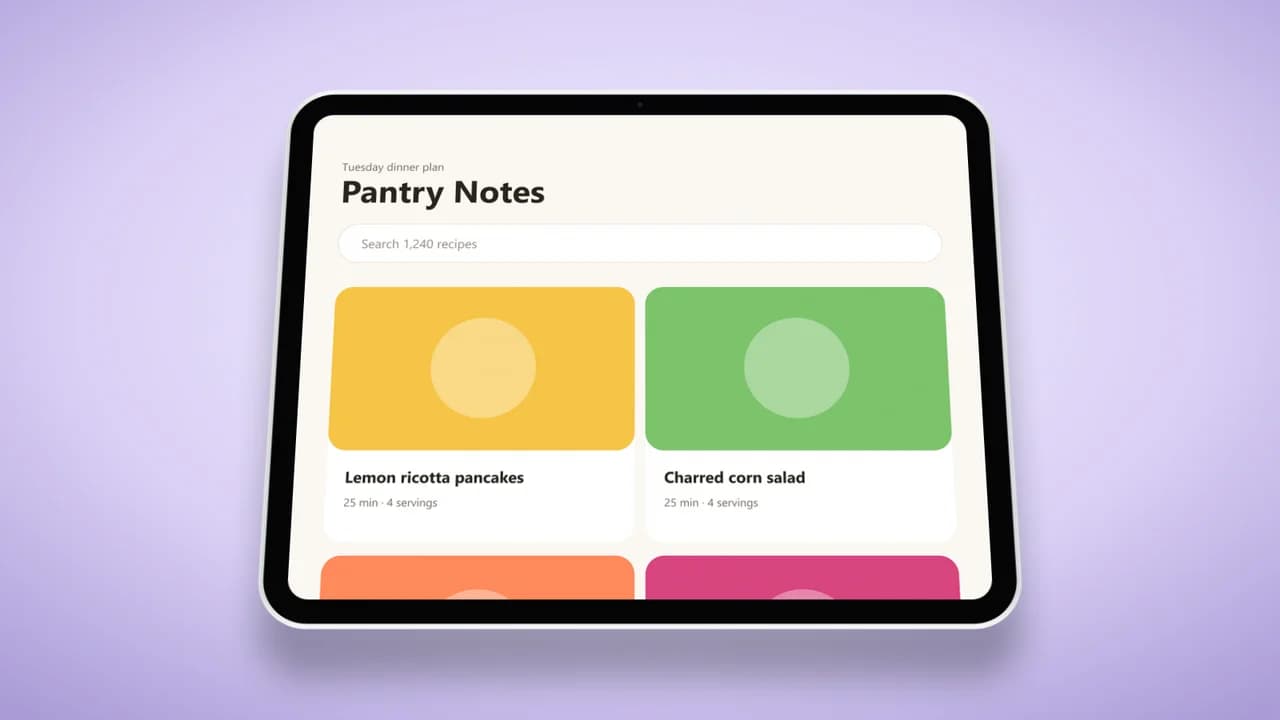
- Test input
- tablet-recipes.png (2064 x 2752 px, our own demo app)
- Output
- iPad Pro 13-inch mockup, 1600 x 900 px PNG
- Device
- iPad Pro 13-inch
- Export size
- 1600 x 900 px
- Angle
- 0° turn, 18° lean
- Background
- radial
- File size
- 419 KB
- Render time
- 223 ms
How we check exports: a script renders every device, compares the screen area with the published resolution, and we look at each frame at full size. More on the about page.
IPad mockup FAQ
Is this iPad mockup free?
Yes. The live preview is free with no limit, and three HD exports a day are free. Clean 2K and 4K exports cost one credit each.
What screenshot size fits the iPad Pro frame?
A capture from an iPad Pro 13 inch is 2064 x 2752 pixels in portrait and fills the screen exactly. Other sizes are cropped from the top.
Can I show the iPad in landscape?
Yes. Switch the orientation to landscape, and the frame turns with your screenshot inside. A Wide 16:9 canvas suits that view best.
Is there an iPad mini frame?
Not yet. Right now the tool has the iPad Pro 13-inch and the iPad Air 11-inch. A mini screenshot still works inside the Air frame.
Can I export an iPad mockup with a transparent background?
Yes. Pick the Transparent background and export as PNG or WebP. The tablet and its shadow keep soft edges on any page.