MacBook mockup generator
To make a MacBook mockup, upload a screenshot from your Mac, pick the MacBook Pro 14 or the MacBook Air 13 and choose a finish. Then set a background, a shadow and an angle. The Pro screen is 3024 x 1964 pixels, so a full screen capture from that Mac fits with no scaling.
By The Bezelyard team (Product and testing). Last updated .
How to make a MacBook mockup, step by step
- Capture your app or site on a Mac, or export a 3024 x 1964 frame from your design file.
- Drop the file onto the tool, or click Choose screenshot.
- Pick MacBook Pro 14-inch or MacBook Air 13-inch.
- Choose a finish, such as Space Black, Silver, Midnight or Starlight.
- Set the canvas, background, shadow and angle, then export.
The live preview is always free, and you get 3 free HD exports a day with a small mark. See the pricing page for clean 4K exports, or read how we test every frame.
Why the MacBook mockup matches a real Mac screen
Apple lists the 14 inch MacBook Pro display at 3024 by 1964 pixels and 254 ppi. So we drew that frame around a screen of the same size, with the camera notch at the top and thin black borders. As a result, a full screen capture from that laptop lands at full resolution.
The 13 inch MacBook Air has a 2560 by 1664 pixel display at 224 ppi, and it has its own frame too. In fact, the two screens share almost the same shape. So one screenshot works in both, and the tool crops the small difference from the bottom.
Pick a MacBook finish for your background
The Pro comes in Space Black and Silver, and the Air adds Midnight, Starlight and Sky Blue. For example, Space Black looks sharp on a white studio sweep, while Silver needs a deeper backdrop such as graphite or a blue lagoon mesh. Starlight, on the other hand, sits warmly on paper or peach tones.
We tested the frames with our demo finance dashboard, a 3024 x 1964 capture with a dark sidebar. On a graphite spotlight with the Silver Pro, the light body framed the dark app well. Next, we tried a slight left turn, and the perspective gave the shot real depth without hiding any of the screen.
Where to use a laptop frame from Apple
A Mac frame says desktop app, SaaS product or web tool at a glance. So it works well as a landing page hero, on a pricing page, in a pitch deck or in a Product Hunt gallery. Also, a framed screen looks finished in a case study, where a raw screenshot can feel like a bug report.
For the web, export a transparent PNG or a WebP, and the shadow blends into any section color. For slides, use Wide 16:9 so the laptop fills the slide. If you need a Windows look instead, the generic laptop frame shares the same controls.
Free and paid exports
The live preview is free with no limit. In addition, three HD exports a day are free at 1600 pixels, with a small corner mark. However, a wide laptop shot often goes into a big hero, so 2K or 4K is usually worth it there.
Each credit gives one clean 2K or 4K export without the mark. A pack of 25 credits costs $6.99, and the credits never expire. Also, a failed export never uses a credit, and your screenshot is dropped from memory after the render.
MacBook mockup frame specs
| Item | Value |
|---|---|
| MacBook Pro 14-inch screen | 3024 x 1964 px at 254 ppi |
| MacBook Air 13-inch screen | 2560 x 1664 px at 224 ppi |
| Pro finishes | Space Black, Silver |
| Air finishes | Midnight, Starlight, Sky Blue, Silver |
| Export sizes | 1600 px free, 2560 or 3840 px with a credit |
| Formats | PNG, WebP, JPG |
MacBook mockup tested with a real screenshot
We rendered this image with the same code the tool on this page uses, from a demo app screenshot we drew ourselves. So the picture and the numbers below come from that run, not from a stock photo.
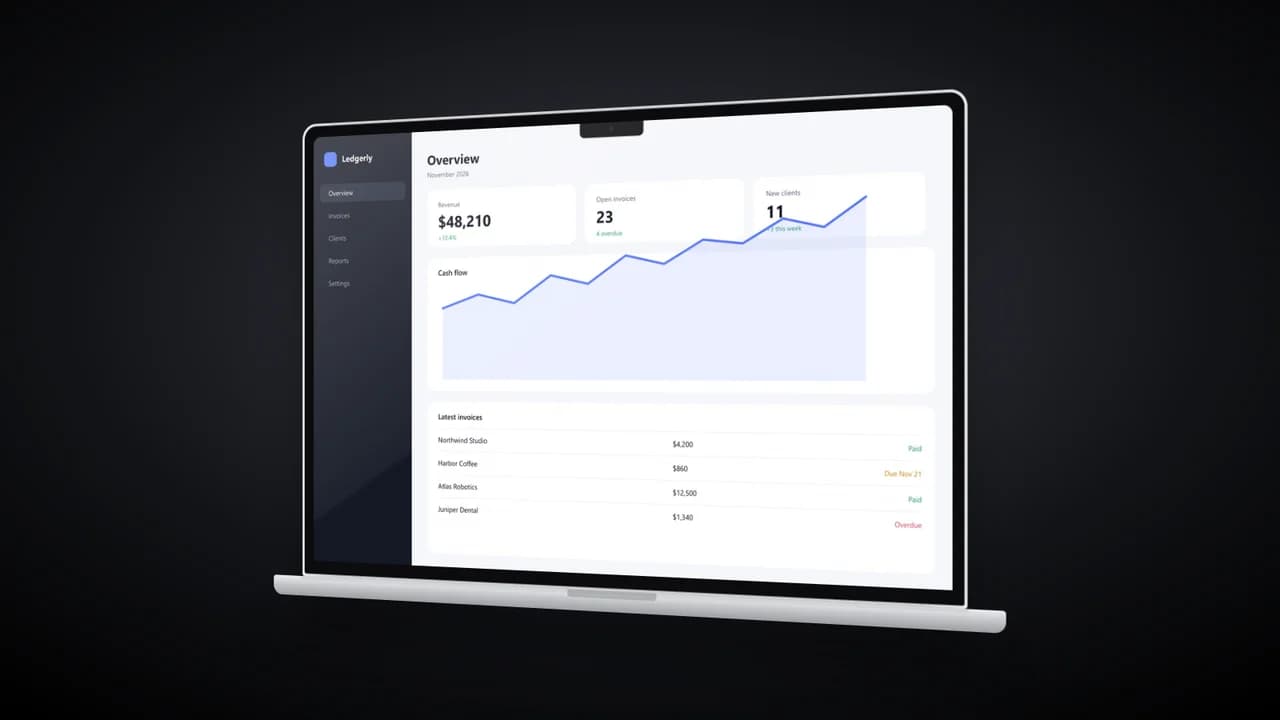
- Test input
- desktop-dashboard.png (3024 x 1964 px, our own demo app)
- Output
- MacBook Pro 14-inch mockup, 1600 x 900 px PNG
- Device
- MacBook Pro 14-inch
- Export size
- 1600 x 900 px
- Angle
- 24° turn, 0° lean
- Background
- radial
- File size
- 371 KB
- Render time
- 242 ms
How we check exports: a script renders every device, compares the screen area with the published resolution, and we look at each frame at full size. More on the about page.
MacBook mockup FAQ
Is this MacBook mockup free?
Yes. The preview is free with no limit, and three HD exports a day are free. Clean 2K and 4K files cost one credit each.
What screenshot size fits a MacBook Pro 14 frame?
A full screen capture at 3024 x 1964 pixels fills it exactly. Smaller captures, such as 1512 x 982, scale up to the same shape.
How do I hide the menu bar in my screenshot?
Capture only the app window, or crop the image before upload. Then pick Contain, and the tool keeps the whole window inside the screen.
Can I tilt the MacBook in 3D?
Yes. Turn left, Turn right, Lean back and Hero angle all work on the laptop frames, and the base turns with the screen.
Can I show a MacBook and an iPhone together?
Not in one render. Instead, export both with a transparent background and the same angle, then place them side by side.