iPhone 15 mockup with pastel colors and the Dynamic Island
An iPhone 15 mockup is a quick way to show your app on a familiar phone. Upload a screenshot, and the frame places it on Apple's 2556 by 1179 pixel, 6.1 inch screen. Then choose Black, Blue, Green or Pink, add a background and an angle, and export the image.
By The Bezelyard team (Product and testing). Last updated .
How to make an iPhone 15 mockup, step by step
- Capture a screen on an iPhone 15, or export a 1179 x 2556 frame from your design file.
- Drop the file on the tool, then confirm iPhone 15 in the Device list.
- Pick Pink, Blue, Green or Black for the frame.
- Set the Graphite background, the Tilted angle and the Crisp shadow.
- Keep the canvas on Fit device, and export as PNG or WebP.
The live preview is always free, and you get 3 free HD exports a day with a small mark. See the pricing page for clean 4K exports, or read how we test every frame.
The iPhone 15 frame, drawn to Apple's numbers
Apple's tech specs give the iPhone 15 a 6.1 inch display at 2556 by 1179 pixels and 460 ppi. So we built the screen area at exactly that size, and a native screenshot fills it without scaling. The iPhone 16 uses the same screen size, which means one set of captures works for both frames.
The iPhone 15 has the Dynamic Island, and our frame shows it above your screenshot. However, it has no Camera Control button, so we left that off the side. The bezels are also a touch wider than on the 16. Those small details matter when a reader compares your mockup with the phone in their hand.
Pastel colors that change the mood
In the tool, the iPhone 15 comes in Black, Blue, Green and Pink. Blue is a pale sky tone, Green leans toward mint, and Pink is a light blush. Black is the only dark option. Because the pastels are so light, they need a background with some contrast.
For example, Pink on the Graphite spotlight gives a warm glow against a near black canvas. Green looks fresh on Paper, while Blue suits the Lagoon mesh for travel or weather apps. Black, in contrast, works on almost anything, but it can feel heavy next to a dark mode screen.
Good uses for an iPhone 15 mockup today
A newer frame is not always the best pick. Support docs, onboarding guides and FAQ pages often show the phone a typical user owns, and that is often an older model. In those cases, an iPhone 15 frame feels honest, because it matches what readers see on their own screens.
It also works for case studies and portfolio pieces from a year or two ago. If you designed an app on a 15, the mockup should match the era of the work. Finally, the Tilted angle rotates the phone 8 degrees, which adds a little energy to a blog header without hiding any of the screen.
iPhone 15 mockup frame specs
| Item | Value |
|---|---|
| Screen size | 6.1 inch |
| Screenshot size | 1179 x 2556 px (portrait) |
| Pixel density | 460 ppi |
| Cutout | Dynamic Island |
| Camera Control | Not on this model |
| Frame colors | Black, Blue, Green, Pink |
| Formats | PNG, WebP, JPG |
IPhone 15 mockup tested with a real screenshot
We rendered this image with the same code the tool on this page uses, from a demo app screenshot we drew ourselves. So the picture and the numbers below come from that run, not from a stock photo.
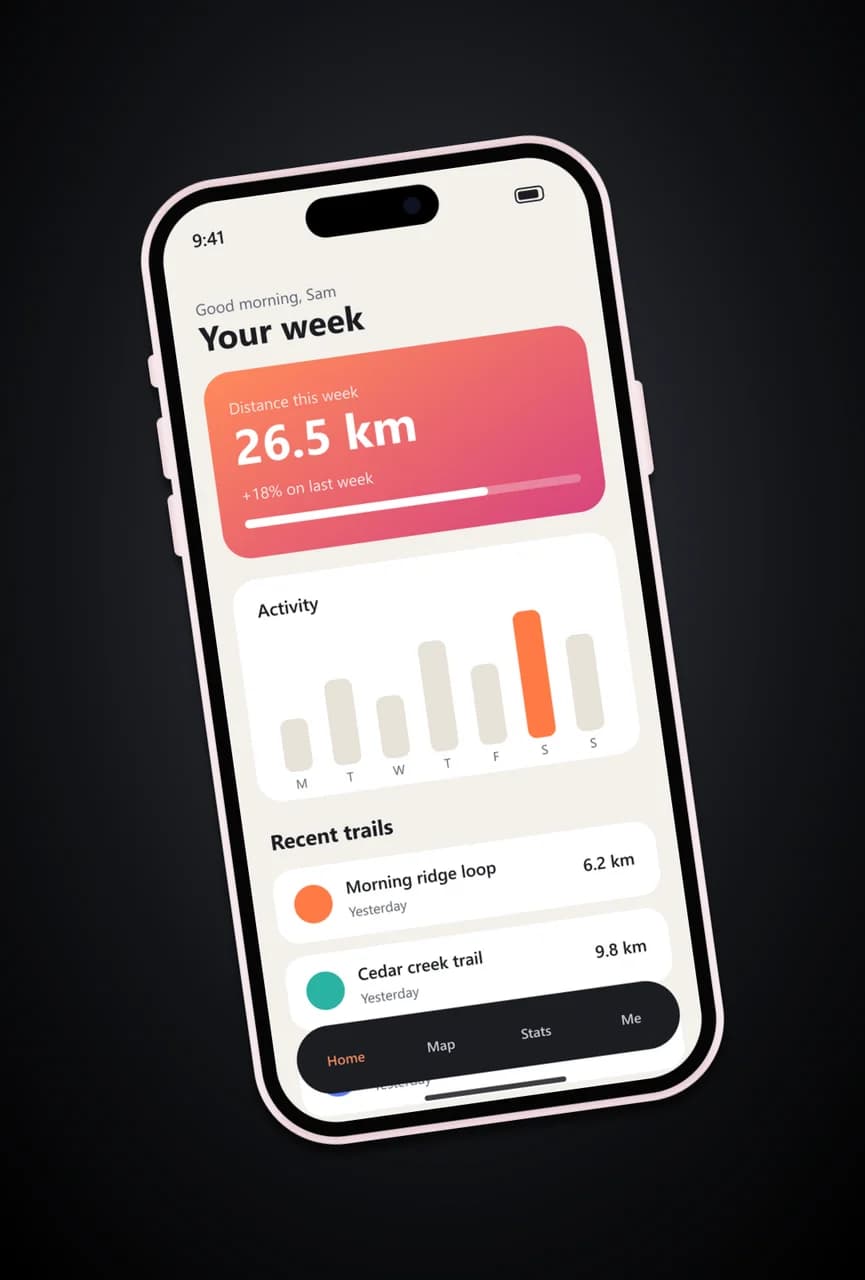
- Test input
- phone-app-1179.png (1179 x 2556 px, our own demo app)
- Output
- iPhone 15 mockup, 1081 x 1600 px PNG
- Device
- iPhone 15
- Export size
- 1081 x 1600 px
- Angle
- 0° turn, 0° lean
- Background
- radial
- File size
- 611 KB
- Render time
- 267 ms
How we check exports: a script renders every device, compares the screen area with the published resolution, and we look at each frame at full size. More on the about page.
IPhone 15 mockup FAQ
Can I download an iPhone 15 mockup for free?
Yes. You get 3 HD exports a day at 1600 pixels at no cost, each with a small corner mark. A credit gives you a clean 2K or 4K file instead.
Does an iPhone 16 screenshot fit the iPhone 15 frame?
Yes. Both phones have a 1179 x 2556 pixel screen, so a capture from either one fits exactly.
Can I change the frame color to match my brand?
Not the frame itself, since you pick one of the four iPhone 15 colors. However, the background takes any color you like, so you can match your brand there.
Does the iPhone 15 mockup include the Dynamic Island?
Yes. The pill shaped cutout sits at the top of the screen, over your screenshot, just like on the real phone. So keep key content away from that spot.
Can I use these images in a client presentation?
Yes. The images you export are yours to use in decks, proposals and portfolios. For a big screen, export at 4K so the slide stays sharp.