iPhone 17 mockup generator
To make an iPhone 17 mockup, drop a screenshot into the tool, pick one of the five iPhone 17 colors and a background, and then set the angle. The frame matches the 2622 by 1206 pixel screen, so a real screenshot fits edge to edge. Finally, export a PNG.
By The Bezelyard team (Product and testing). Last updated .
How to make an iPhone 17 mockup, step by step
- Take a screenshot on your iPhone, or export a 1206 x 2622 frame from your design app.
- Drop the file onto the tool, or click Choose screenshot.
- Pick a frame color such as Lavender, Sage or Black.
- Choose a background, a shadow and an angle preset.
- Press Export mockup and download the PNG.
The live preview is always free, and you get 3 free HD exports a day with a small mark. See the pricing page for clean 4K exports, or read how we test every frame.
Why the iPhone 17 mockup fits your screenshot exactly
Apple lists the iPhone 17 display at 2622 by 1206 pixels at 460 ppi. So we drew the frame around a screen of exactly that size. As a result, a screenshot from the phone drops in at full resolution, with no stretching and no soft edges.
In addition, the corners follow the rounded display, and the Dynamic Island sits on top of your image, just like on the real phone. Also, the side buttons and the new Camera Control are part of the drawing. That way the phone reads as an iPhone 17 even at thumbnail size.
Pick a color, a background and an angle
The iPhone 17 comes in Black, Lavender, Mist Blue, Sage and White, and each one is a swatch in the tool. For example, Lavender looks soft on a peach gradient, while Black stands out on a light studio sweep.
Next, choose the scene. Backgrounds include solid colors, gradients, a spotlight and mesh blends, or a transparent canvas. Then pick an angle. Turn left and Turn right rotate the phone in real perspective, and Hero angle adds a slight lean for launch posts.
Free and paid iPhone 17 mockup exports
The live preview is free and has no limit, so you can try every color first. In addition, you get a few free HD exports a day at 1600 pixels, with a small mark in the corner. That is plenty for a quick Slack message or a draft deck.
For a launch, however, a credit gives you a clean file in 2K or 4K. Credits never expire, and a failed export never uses one. See the pricing page for packs.
iPhone 17 mockup frame specs
| Item | Value |
|---|---|
| Screen size | 6.3 inch |
| Screenshot size | 1206 x 2622 px (portrait) |
| Pixel density | 460 ppi |
| Frame colors | Black, Lavender, Mist Blue, Sage, White |
| Export sizes | 1600 px free, 2560 or 3840 px with a credit |
| Formats | PNG, WebP, JPG |
IPhone 17 mockup tested with a real screenshot
We rendered this image with the same code the tool on this page uses, from a demo app screenshot we drew ourselves. So the picture and the numbers below come from that run, not from a stock photo.
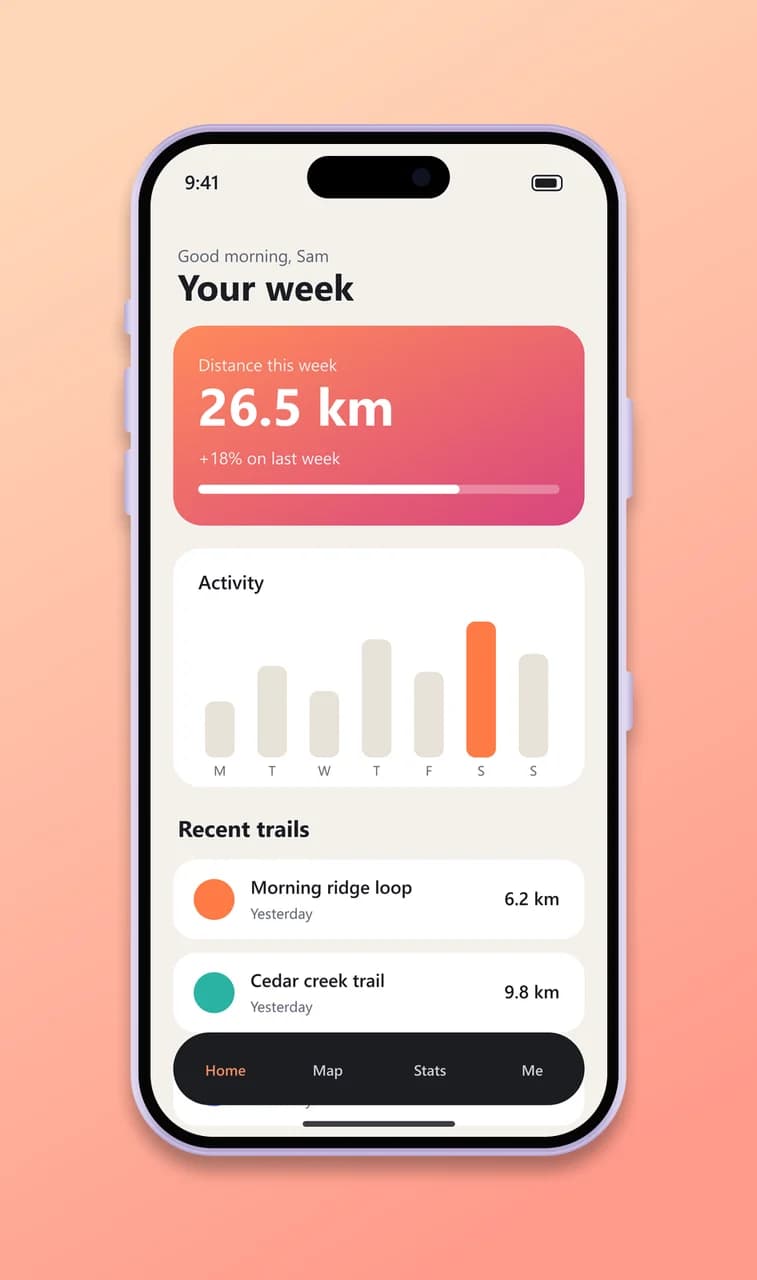
- Test input
- phone-app.png (1206 x 2622 px, our own demo app)
- Output
- iPhone 17 mockup, 946 x 1600 px PNG
- Device
- iPhone 17
- Export size
- 946 x 1600 px
- Angle
- 0° turn, 0° lean
- Background
- linear
- File size
- 206 KB
- Render time
- 197 ms
How we check exports: a script renders every device, compares the screen area with the published resolution, and we look at each frame at full size. More on the about page.
IPhone 17 mockup FAQ
Is this iPhone 17 mockup free?
Yes. The preview is free with no limit, and you get free HD exports every day. Clean 2K and 4K exports cost one credit each.
What size should my screenshot be?
A screenshot taken on an iPhone 17 is 1206 x 2622 pixels, which fills the screen exactly. Other sizes work too, and the tool crops them from the top.
Can I make an iPhone 17 mockup with a transparent background?
Yes. Pick the Transparent background and export as PNG. The phone and its shadow keep their soft edges on any color.
Is the iPhone 17 mockup the same as the iPhone 17 Pro?
They share the same 6.3 inch screen size. However, the Pro frame has its own colors and slimmer bezels, so it has its own page.
Do you keep my screenshot?
No. The file stays in memory for one export and is then dropped. We never store or train on your images.