Laptop mockup generator
To make a laptop mockup, upload a screenshot of your app or website and keep the Windows-style laptop frame. Then pick Graphite or Platinum, a background and an angle. The screen is 1920 x 1080 pixels, the most common desktop size, so a full HD capture fills it with no cropping at all.
By The Bezelyard team (Product and testing). Last updated .
How to make a laptop mockup, step by step
- Capture your screen at 1920 x 1080, or export a frame of that size.
- Drop the file onto the tool, or click Choose screenshot.
- Keep the Windows laptop, or switch to a MacBook frame.
- Pick Graphite or Platinum and a background that contrasts with it.
- Choose a shadow and an angle, then export PNG, WebP or JPG.
The live preview is always free, and you get 3 free HD exports a day with a small mark. See the pricing page for clean 4K exports, or read how we test every frame.
A neutral laptop for any 1080p screenshot
Many products run in a browser or on Windows, so an Apple frame does not always fit the story. That is why we drew a plain laptop with a 15.6 inch class body, thin black borders and no notch. Its screen is exactly 1920 x 1080 pixels, which matches the default capture on most Windows machines.
As a result, a full screen grab drops in pixel for pixel. Also, a 16:9 export from Figma or a video still fits the same way. If your image has another shape, the tool crops it from the top, or you can pick Contain to keep everything in view.
Graphite or Platinum: matching the laptop mockup to the scene
The frame comes in two finishes. Graphite is a dark gray body that looks crisp on light backdrops such as paper, studio white or mint. Platinum, on the other hand, is a light silver that needs depth behind it, so pair it with a graphite spotlight or a deep lagoon mesh.
We tested both with our own demo dashboard at 1920 x 1080. On a lagoon mesh with the Hero angle, the Graphite body kept a clear edge against the blue. Then we switched to a flat view for a docs page, and the same file read cleanly at a small width.
When to switch to a MacBook frame
If your product is a Mac app, or your audience mostly uses Macs, the MacBook Pro 14 and MacBook Air 13 frames tell that story better. They use the native Retina sizes, 3024 x 1964 and 2560 x 1664 pixels. So a full HD capture still works there, although it scales up to fill the taller screen.
For mixed audiences, however, the generic laptop stays neutral. It also suits screens that show Windows controls, a Chromebook style web app or an internal tool. In fact, many SaaS teams keep one Windows shot and one Mac shot for the same feature page.
Exports and pricing
The live preview is free with no limit. In addition, three HD exports a day are free at 1600 pixels, with a small mark in the corner. That is plenty for a help article or an internal update.
For a hero banner or a printed one pager, a credit buys a clean 2K or 4K file. A pack of 25 credits costs $6.99, credits never expire, and a failed export never uses one. Finally, your screenshot stays in memory for one export and is then deleted.
Laptop mockup frame specs
| Item | Value |
|---|---|
| Windows laptop screen | 1920 x 1080 px, 15.6 inch class |
| Windows laptop finishes | Graphite, Platinum |
| MacBook Pro 14-inch screen | 3024 x 1964 px at 254 ppi |
| MacBook Air 13-inch screen | 2560 x 1664 px at 224 ppi |
| Export sizes | 1600 px free, 2560 or 3840 px with a credit |
| Formats | PNG, WebP, JPG |
Laptop mockup tested with a real screenshot
We rendered this image with the same code the tool on this page uses, from a demo app screenshot we drew ourselves. So the picture and the numbers below come from that run, not from a stock photo.
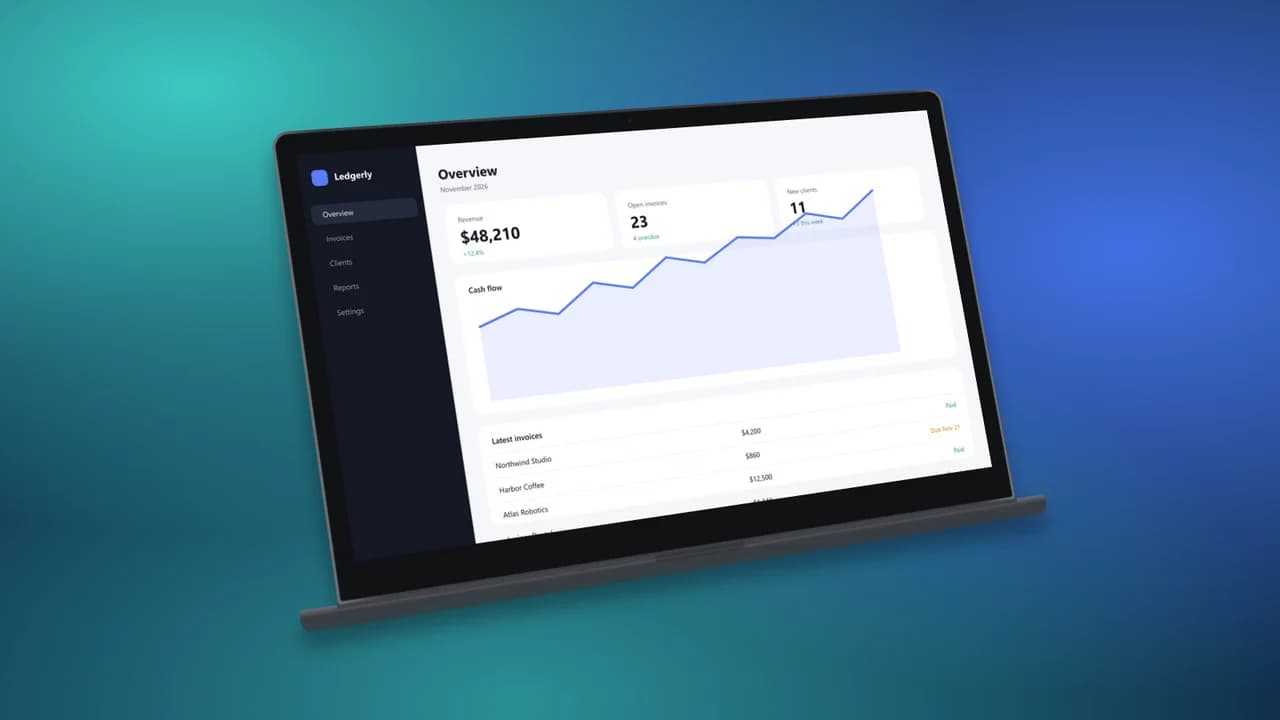
- Test input
- desktop-1080p.png (1920 x 1080 px, our own demo app)
- Output
- Windows laptop mockup, 1600 x 900 px PNG
- Device
- Windows laptop
- Export size
- 1600 x 900 px
- Angle
- -22° turn, 10° lean
- Background
- mesh
- File size
- 606 KB
- Render time
- 243 ms
How we check exports: a script renders every device, compares the screen area with the published resolution, and we look at each frame at full size. More on the about page.
Laptop mockup FAQ
Is this laptop mockup free?
Yes. The preview is free with no limit, and three HD exports a day are free. A clean 2K or 4K export costs one credit.
What screenshot size works best?
A 1920 x 1080 capture fits the Windows laptop exactly. Larger 16:9 images, such as 2560 x 1440, also fit and are scaled down to the screen.
Is the laptop a specific brand?
No. It is a generic laptop with a full HD screen, so it does not point at one maker. For an Apple look, use the MacBook frames.
Can I put a website screenshot in the laptop?
Yes. Capture the page in your browser first, then upload it. The tool does not grab a URL for you, so you keep full control over what shows.
Can I make a laptop mockup with a transparent background?
Yes. Choose the Transparent background and export as PNG or WebP. The laptop and its soft shadow then sit on any color.