iPhone app mockup for App Store screenshots
To make an iPhone app mockup, upload a screen from your app, keep the iPhone 17 Pro Max frame and pick the App Store canvas. Then add a background and an angle. The canvas is 1290 x 2796 pixels, a 6.9 inch size that App Store Connect accepts, so the file is ready to upload.
By The Bezelyard team (Product and testing). Last updated .
How to make an iPhone app mockup, step by step
- Export a screen from your app or design file, ideally at 1320 x 2868 pixels.
- Drop the file onto the tool, or click Choose screenshot.
- Keep the iPhone 17 Pro Max and pick a color such as Deep Blue or Silver.
- Set the canvas to App Store 1290 x 2796 and choose a background.
- Add a shadow and an angle, then press Export mockup.
The live preview is always free, and you get 3 free HD exports a day with a small mark. See the pricing page for clean 4K exports, or read how we test every frame.
Why we start every iPhone app mockup on the Pro Max
App Store Connect asks for 6.9 inch screenshots, and it takes them at 1320 x 2868 or 1290 x 2796 pixels in portrait. The iPhone 17 Pro Max has a 6.9 inch screen at 2868 by 1320 pixels and 460 ppi. So we drew its frame around a screen of exactly that size, and a capture from the phone fills it with no scaling at all.
In addition, the App Store canvas preset sets the output to 1290 x 2796. The phone sits inside that tall frame with room above and below, which is where most teams put a short headline later. As a result, you get one file per screen that already has the right shape for the store.
Build a set of store screenshots that match
A store page usually shows three to six screens in a row. Because of that, they should share one color, one background and one angle. We tested this with our demo habit tracker: five screens, the Deep Blue frame, a dusk mesh background and the Hero angle. Then we changed only the screenshot between exports, and the row looked like one design.
Next, think about contrast. A dark app reads best on a light studio sweep with a Silver frame, while a bright app pops on a deep blue or graphite gradient. Also, keep the angle mild for store art. A flat or slightly turned phone keeps the text readable at the small size buyers see first.
Use the same app mockup on Product Hunt and your site
The same render works outside the store too. For example, a Product Hunt gallery, a launch tweet and the hero of your landing page can all use the same phone. So switch the canvas from App Store to Wide 16:9 or Square, and the tool keeps your screen, color and angle.
For the web, a transparent PNG or a WebP keeps the page light. However, store uploads need a solid background, so pick a color or a gradient there. JPG also works for the store when you want a smaller file, since the background has no transparent edge.
What a mockup export costs
The live preview is free, so you can try every color and canvas first. In addition, you get three free HD exports a day at 1600 pixels, each with a small corner mark. Those are fine for a draft or a team review.
For the final store set, a credit buys one clean 2K or 4K export with no mark. A pack of 25 credits costs $6.99, the credits never expire, and a failed export never uses one. Your screenshot stays in memory for one export and is then dropped.
iPhone app mockup sizes for the App Store
| Item | Value |
|---|---|
| Device frame | iPhone 17 Pro Max, 6.9 inch |
| Native screen | 1320 x 2868 px at 460 ppi |
| App Store 6.9 inch sizes | 1320 x 2868 or 1290 x 2796 px (portrait) |
| App Store canvas preset | 1290 x 2796 px |
| Frame colors | Cosmic Orange, Deep Blue, Silver |
| Formats | PNG, WebP, JPG |
IPhone app mockup tested with a real screenshot
We rendered this image with the same code the tool on this page uses, from a demo app screenshot we drew ourselves. So the picture and the numbers below come from that run, not from a stock photo.
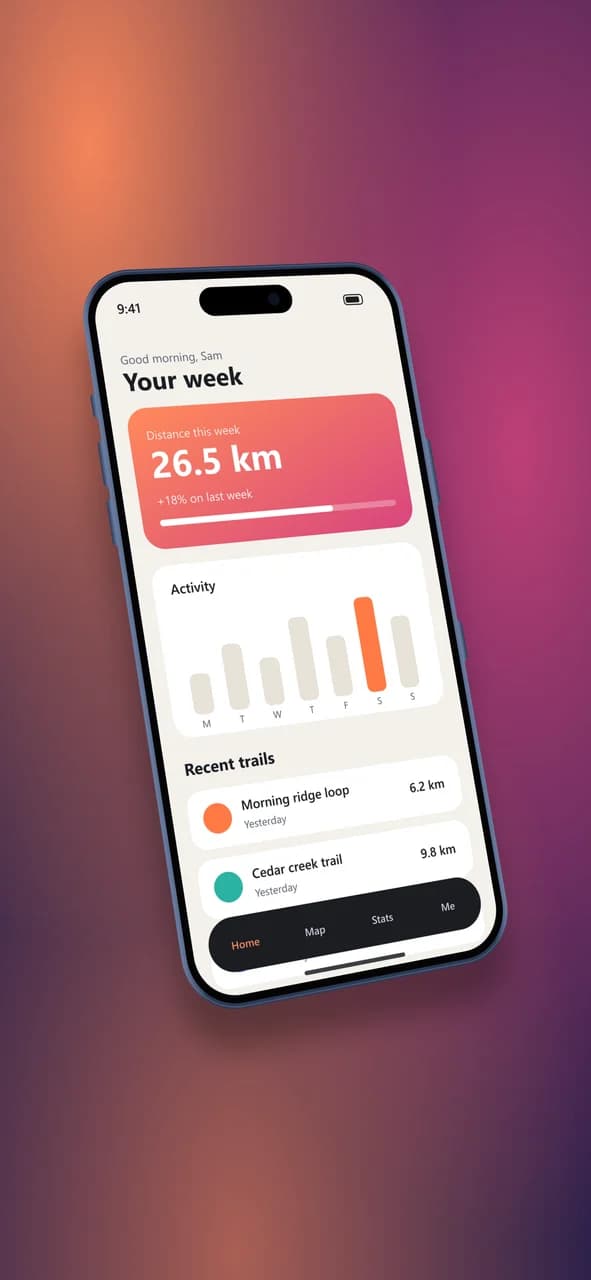
- Test input
- phone-app.png (1206 x 2622 px, our own demo app)
- Output
- iPhone 17 Pro Max mockup, 1290 x 2796 px PNG
- Device
- iPhone 17 Pro Max
- Export size
- 1290 x 2796 px
- Angle
- -22° turn, 10° lean
- Background
- mesh
- File size
- 1444 KB
- Render time
- 594 ms
How we check exports: a script renders every device, compares the screen area with the published resolution, and we look at each frame at full size. More on the about page.
IPhone app mockup FAQ
What size should an iPhone app mockup be for the App Store?
For the 6.9 inch slot, App Store Connect accepts 1320 x 2868 or 1290 x 2796 pixels in portrait. The App Store canvas in our tool exports at 1290 x 2796.
Can I add a headline above the phone?
Not inside the tool. Instead, export the mockup with extra padding and add the text in your design app, where you can match your brand fonts.
Does the App Store accept screenshots inside a device frame?
Many apps use framed screens on their store pages. Still, check the current App Store guidelines and make sure the art shows your real app.
Can I use a screenshot from a smaller iPhone?
Yes. The tool crops it from the top to fill the Pro Max screen, or you can pick Contain to keep the whole image with a thin fill around it.
Do you store my app screenshots?
No. Each file is read into memory for one export and then dropped. So unreleased screens never sit on our server.