Phone mockup generator for Android and iPhone
To make a phone mockup, upload a screenshot and pick a frame: the Android phone with a punch-hole camera or any iPhone from 15 to 17. Next, choose a color, a background and an angle. The Android screen is 1080 x 2400 pixels, so a standard capture fills it edge to edge.
By The Bezelyard team (Product and testing). Last updated .
How to make a phone mockup, step by step
- Take a screenshot on your phone, or export a frame from your design file.
- Drop it onto the tool, or click Choose screenshot.
- Pick Android phone, or switch to an iPhone in the device list.
- Choose a finish such as Obsidian, Porcelain or Jade.
- Set a background, a shadow and an angle, then export the file.
The live preview is always free, and you get 3 free HD exports a day with a small mark. See the pricing page for clean 4K exports, or read how we test every frame.
One phone frame that is not tied to a brand
Most Android apps run on many phones, so a single brand rarely tells the right story. That is why we drew a generic Android phone. It has slim, even bezels, rounded corners and a small punch-hole camera near the top. As a result, it reads as a modern Android device without pointing at one maker.
The screen inside the frame is 1080 x 2400 pixels, a common full HD+ size. So a capture from many current Android phones drops in at full size. If your screenshot has a different shape, the tool crops it from the top, or you can switch to Contain and keep the whole image.
Android and iPhone phone mockups side by side
Cross-platform teams often need both versions of the same screen. First, render the Android frame with your Android build. Then switch the device to an iPhone 17 or 17 Pro and drop in the iOS capture. Because the background, shadow and angle stay the same, the two images sit well next to each other on a landing page.
For example, we ran our demo finance app through both frames. The dark Obsidian Android phone and the Black iPhone 17 matched closely on a mint gradient. However, a light app looked better in the Porcelain Android frame next to a White iPhone, since the pale edges blended into the screen.
Preview art for your Google Play listing
Play Console lets you add screenshots and other preview assets to your store listing. A framed phone helps a busy screen stand out in that row, so many teams use one. Still, read the current Play Console rules on asset sizes before you upload, since the requirements change over time.
Google also offers its own Device Art Generator on the Android Developers site, which wraps a screenshot in a set of stock frames. Our tool takes a different route. Instead of a fixed look, you choose the color, the gradient, the shadow and a real 3D turn, and then export PNG, WebP or JPG at up to 3840 pixels.
Free exports and credits
The live preview has no limit. In addition, three HD exports a day are free at 1600 pixels, with a small mark in the corner. That size is enough for a chat message, a wiki page or a first draft of a deck.
For clean files, one credit gives you one 2K or 4K export without the mark. A pack of 25 credits costs $6.99, and credits never expire. Also, a failed export never uses a credit, and we drop your screenshot from memory right after the render.
Phone mockup frames in the tool
| Item | Value |
|---|---|
| Android screen | 1080 x 2400 px, punch-hole camera |
| Android finishes | Obsidian, Porcelain, Jade |
| iPhone frames | iPhone 15, 16, 16 Pro, 17, 17 Pro, 17 Pro Max, Air |
| Orientation | Portrait or landscape |
| Export sizes | 1600 px free, 2560 or 3840 px with a credit |
| Formats | PNG, WebP, JPG |
Phone mockup tested with a real screenshot
We rendered this image with the same code the tool on this page uses, from a demo app screenshot we drew ourselves. So the picture and the numbers below come from that run, not from a stock photo.
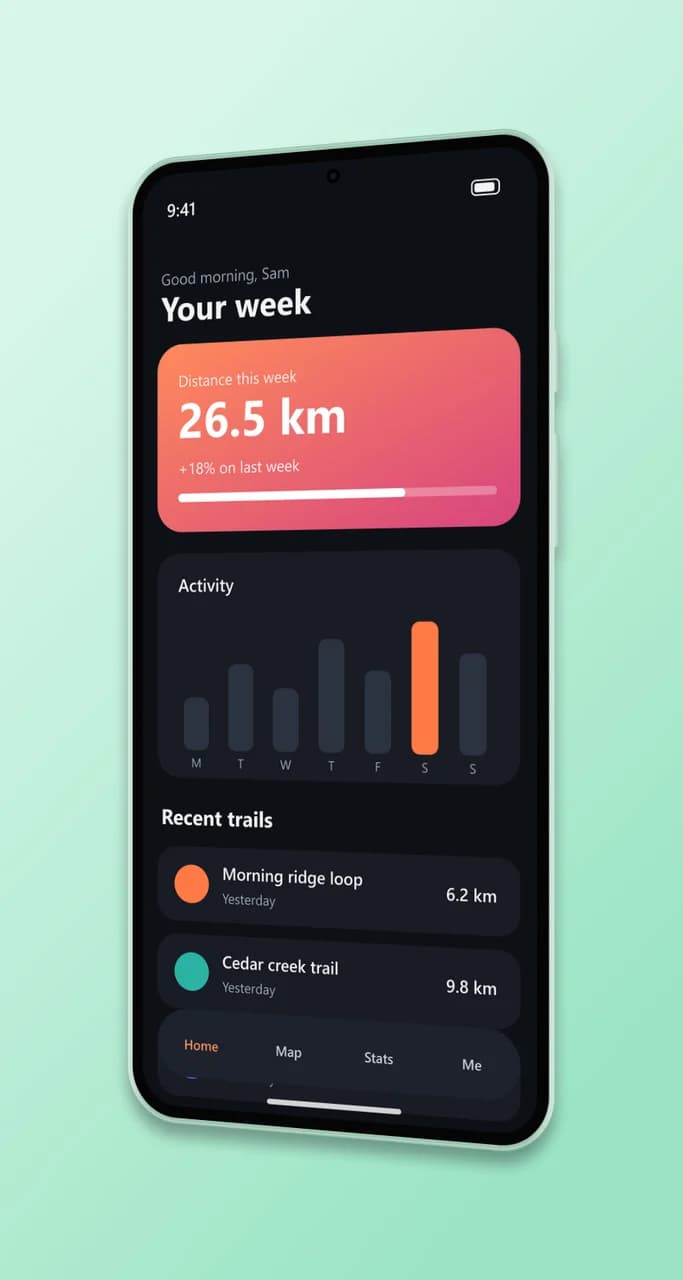
- Test input
- phone-app-dark.png (1206 x 2622 px, our own demo app)
- Output
- Android phone mockup, 854 x 1600 px PNG
- Device
- Android phone
- Export size
- 854 x 1600 px
- Angle
- 24° turn, 0° lean
- Background
- linear
- File size
- 435 KB
- Render time
- 181 ms
How we check exports: a script renders every device, compares the screen area with the published resolution, and we look at each frame at full size. More on the about page.
Phone mockup FAQ
Is this phone mockup free?
Yes. The preview is free with no limit, and three HD exports a day are free. Clean 2K and 4K files cost one credit each.
Which Android phone is the frame based on?
None in particular. It is a generic modern phone with a punch-hole camera and a 1080 x 2400 screen, so it fits most Android apps.
Can I turn the phone sideways?
Yes. Switch the orientation to landscape for games, video players or wide charts. The screenshot then fills the rotated screen.
Can I put two phones in one image?
Not in one render. Instead, export each phone with a transparent background and place them together in your design app or slide.
What format is best for a Play Store listing?
PNG or JPG with a solid background works well for store uploads. However, keep transparent PNG or WebP for web pages and slides.