iPhone 17 Pro mockup in Cosmic Orange, Deep Blue and Silver
An iPhone 17 Pro mockup puts your screenshot inside a frame we drew around Apple's 1206 by 2622 pixel Pro screen. Drop the file, pick Cosmic Orange, Deep Blue or Silver, then choose a background and an angle. For the bigger phone, switch to the 17 Pro Max frame, which takes 1320 by 2868 pixels.
By The Bezelyard team (Product and testing). Last updated .
How to make an iPhone 17 Pro mockup, step by step
- Grab a screenshot on the phone, or export a 1206 x 2622 artboard from Figma or Sketch.
- Drop it on the tool and keep iPhone 17 Pro selected, or switch to iPhone 17 Pro Max.
- Click Cosmic Orange, Deep Blue or Silver to set the frame color.
- Choose the Dusk background, then click Hero angle.
- Set the shadow to Floating and the canvas to Square 1:1, then press Export mockup.
The live preview is always free, and you get 3 free HD exports a day with a small mark. See the pricing page for clean 4K exports, or read how we test every frame.
What makes the iPhone 17 Pro mockup different from the 17
The 17 Pro and the regular 17 share a 6.3 inch screen, and Apple lists both at 2622 by 1206 pixels. So the same screenshot fits either frame. The difference lives in the details we drew. For example, the Pro frame has thinner bezels, so the screen looks a little larger inside the same outline.
Color is the other big change. The Pro line offers three finishes in the tool: Cosmic Orange, Deep Blue and Silver. Cosmic Orange is the loud one, and it pops on a dark mesh or the Graphite spotlight. Deep Blue, on the other hand, looks calm on a peach or mint gradient. Silver works best when you want the app screen to carry all the color.
Switch to 17 Pro Max for the 6.9 inch screen
Apple lists the 17 Pro Max display at 6.9 inches and 2868 by 1320 pixels, at the same 460 ppi. Because of that, it needs its own frame. We built it around a 1320 x 2868 screen, so a Pro Max capture lands at full size with nothing cut off.
That size also matters for the App Store. App Store Connect accepts 6.9 inch screenshots at 1320 x 2868 pixels, which is exactly the Pro Max screen. So if your store set starts from Pro Max captures, use this frame for the matching marketing shots. Then the phone in your hero image and the screens in your listing tell the same story.
Angles and shadows that suit a Pro launch
A Pro phone often leads a launch post, so the angle matters. Hero angle turns the phone 22 degrees, leans it back 10 and rotates it 6. As a result, the screen still reads clearly, while the side band catches the light. If the post needs to feel calmer, Turn left or Turn right gives a clean side view instead.
Next, pick a shadow. Floating lifts the phone off the canvas, which looks good in a Product Hunt gallery. Crisp gives a short, hard shadow for flat, poster style layouts. For the sample on this page, we rendered an iPhone 17 Pro mockup in Deep Blue at Hero angle on the Dusk mesh, and the screen text stayed sharp at 1600 pixels.
iPhone 17 Pro and Pro Max mockup frame specs
| Item | Value |
|---|---|
| 17 Pro screen | 6.3 inch, 1206 x 2622 px |
| 17 Pro Max screen | 6.9 inch, 1320 x 2868 px |
| Pixel density | 460 ppi on both |
| Frame colors | Cosmic Orange, Deep Blue, Silver |
| App Store 6.9 inch sizes | 1320 x 2868 or 1290 x 2796 px |
| Export sizes | 1600 px free, 2560 or 3840 px with a credit |
IPhone 17 pro mockup tested with a real screenshot
We rendered this image with the same code the tool on this page uses, from a demo app screenshot we drew ourselves. So the picture and the numbers below come from that run, not from a stock photo.
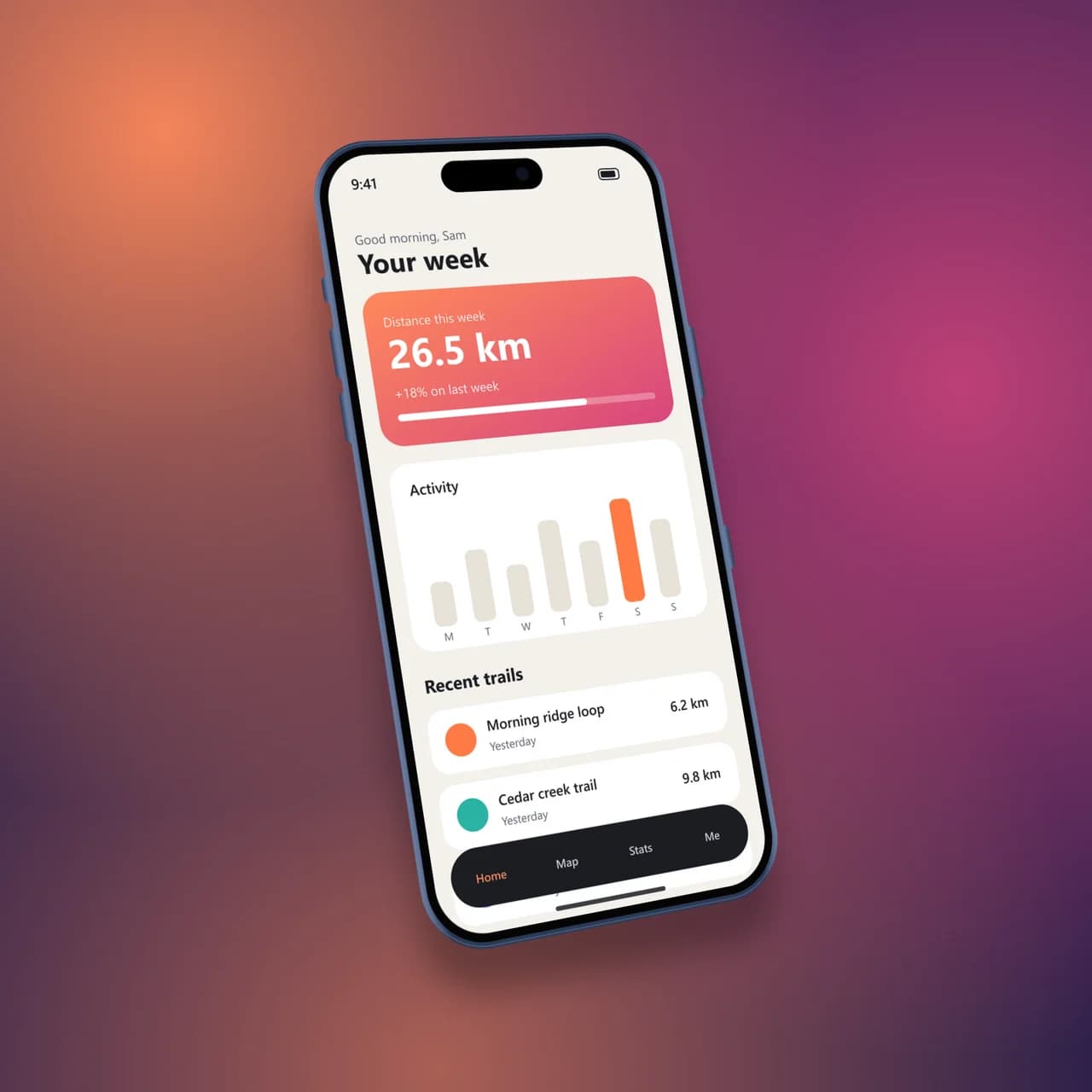
- Test input
- phone-app.png (1206 x 2622 px, our own demo app)
- Output
- iPhone 17 Pro mockup, 1600 x 1600 px PNG
- Device
- iPhone 17 Pro
- Export size
- 1600 x 1600 px
- Angle
- -22° turn, 10° lean
- Background
- mesh
- File size
- 1053 KB
- Render time
- 470 ms
How we check exports: a script renders every device, compares the screen area with the published resolution, and we look at each frame at full size. More on the about page.
IPhone 17 pro mockup FAQ
Can I make an iPhone 17 Pro mockup for free?
Yes. The live preview costs nothing, and you get 3 free HD exports a day at 1600 pixels with a small corner mark. A clean 2K or 4K file costs one credit.
Does the 17 Pro Max frame need a different screenshot size?
Yes. It expects 1320 x 2868 pixels, while the 17 Pro takes 1206 x 2622. A smaller file still works, because the tool scales it to fill the screen.
Which frame color suits a dark app?
Silver or Cosmic Orange. Both give a light edge around a dark screen, so the phone outline stays clear. Deep Blue can blend into a dark interface when the background is dark too.
Can I show the 17 Pro in landscape?
Yes. Press the Portrait button next to the color swatches to flip the frame. That suits games and video apps that run sideways.
Is an iPhone 17 Pro mockup accurate enough for an App Store page?
The screen matches Apple's published pixel size, so your captures fit exactly. Still, read Apple's rules on showing its devices before you upload store images.